iOS Camera Access
3 min
Follow these steps if StreamYard is unable to access your camera/mic on iOS.
Ensure Safari has Camera/Microphone Access
- Open your iPhone/iPad settings.
- Find Safari in the settings list and ensure camera/mic access is on.
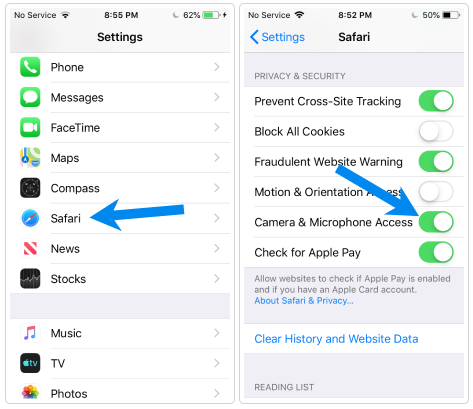
Safari Camera & Microphone Access
IOS 13+: Allowing Camera/Microphone Access
iOS 13+ Requirements
iOS 13 and above has special requirements to allow access.
If you are on iOS 13 or higher, follow these steps:
- On the broadcast studio page, tap the AA icon, then Website Settings.
- Ensure both Camera and Microphone are set to Allow or Ask.
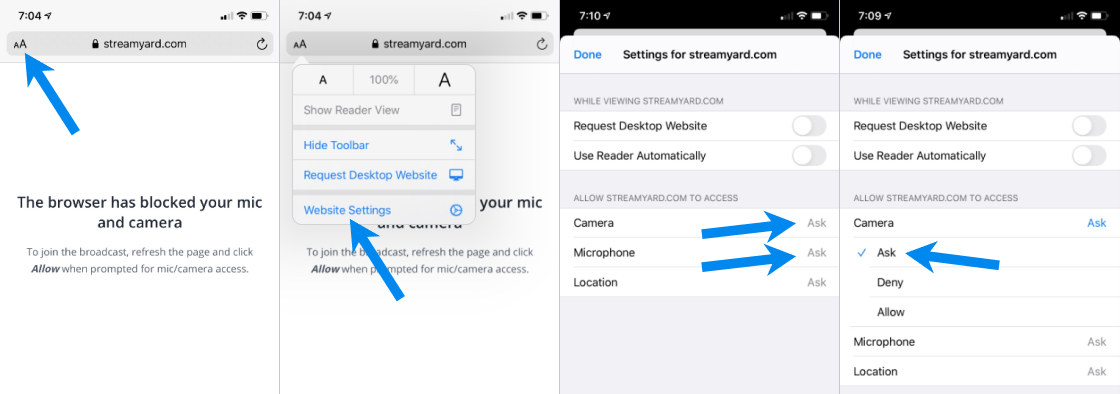
iOS 13+ Settings